

PaperBull / Design & Print Preparation
Cup Sleeve Design: From Concept to Print-Ready Brief
Good cup sleeve design starts with the right cup, a clear message and the supplier’s template. Compare three original concepts, then prepare artwork for print and proof approval.
Botanical, graphic and architectural
Start with the actual cup reference
Use the chosen supplier’s approved file
Concept, artwork, sample and proof
Start Cup Sleeve Design with the Actual Cup
This guide focuses on a removable printed paper sleeve around a separate takeaway cup. The cup remains visible above and below the band. Use the three original concepts below to choose a visual direction, then turn that direction into an artwork brief your supplier can review.
Before placing a logo, identify the exact cup used in each location or drink program. Record its supplier and product reference, then ask for the sleeve template approved for that pairing. PaperBull’s custom cup sleeve options describe confirming a dieline from the cup sample, drawing or exact specification, including the body diameter, taper and height.
If your chain uses different cups across stores, keep those pairings visible in the brief. Coordinate the sleeve with your hot paper cup selection before fixing the final composition.
Decide the sleeve’s job, too. Is it the main brand identifier on a plain cup, a seasonal layer over an existing cup design, or an event message? Choose one primary message and a clear secondary action. A short brand name, a campaign line and an optional destination can form a useful hierarchy; trying to give each equal emphasis makes review harder.
Three Original Coffee Cup Sleeve Design Directions
These fictional concepts show different ways to organize the same small surface. Each uses a distinct removable sleeve, with a white cup visible at its top and bottom. The images are visual studies: they do not establish a production material, approved ink result, thermal performance or finished fit.
01 — Herbarium Fold: A Botanical Mark with Breathing Room
Herbarium Fold pairs a natural kraft appearance with deep green fern forms, broad strokes and deliberate negative space. A single cup on greenhouse stone gives the botanical direction a believable setting without filling the sleeve with decorative detail.
The design places its identifying mark in a calm front area. Fern shapes can travel toward the sides, where a partial leaf still reads as intentional when the sleeve turns. The generous spaces between strokes also offer a simpler starting point for a production discussion than a drawing built around fine leaf veins.
Choose it for: a café identity that needs a recognizable everyday sleeve and room for small seasonal changes. Keep the main mark stable; change the supporting botanical motif across a coordinated series.
Watch for: the brown stock appearance and dark green artwork may produce less contrast than a bright screen suggests. The botanical theme can also feel familiar, so recognition needs a distinctive mark or silhouette. Review the actual stock and print proof before committing to the palette.
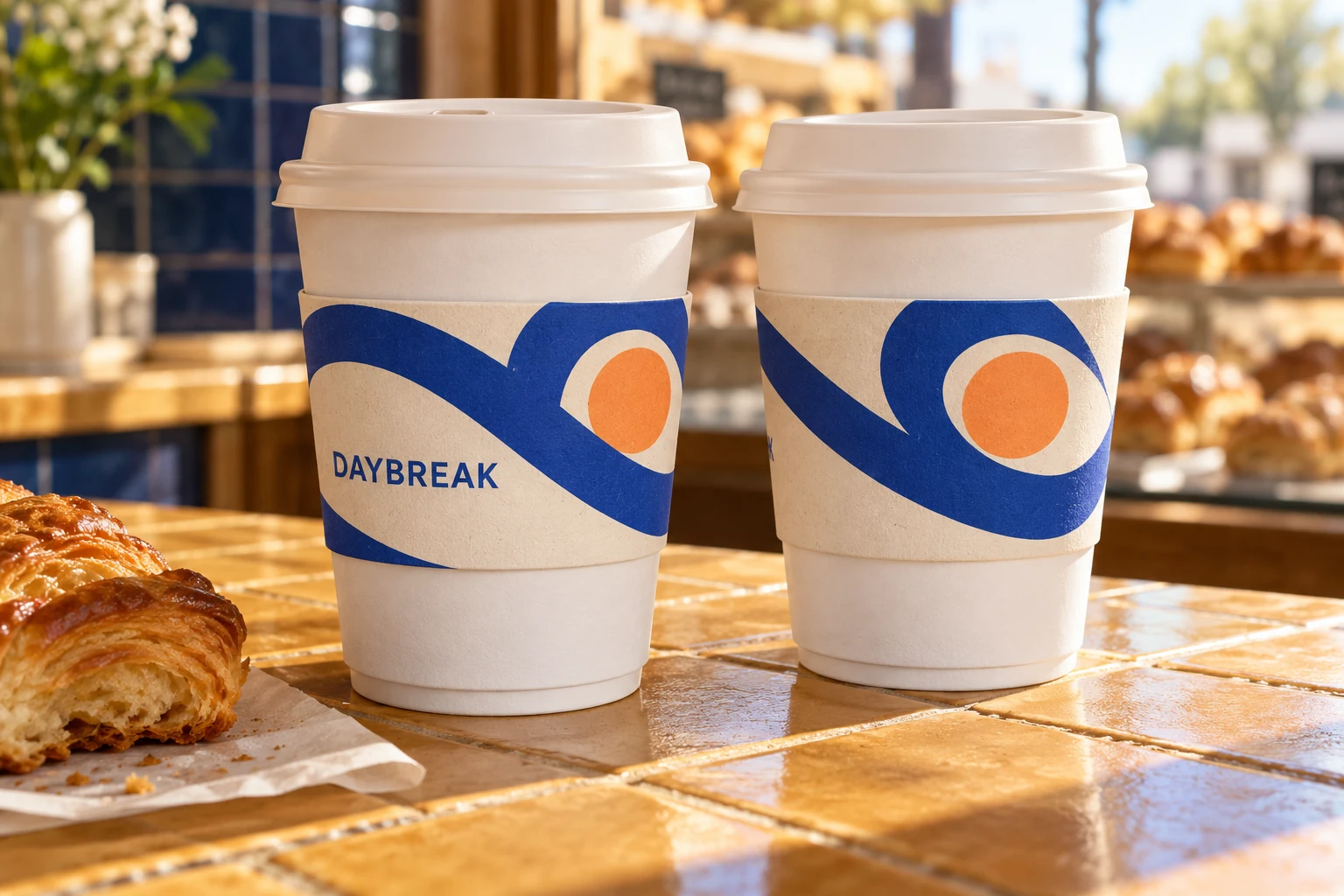
02 — Daybreak Loop: A Graphic System for a Busy Counter
Daybreak Loop uses a cream background, bold cobalt curves and apricot discs. Two cups at the same level in a bakery setting show how related compositions can feel like a conversation. The repeated shapes connect the pair without requiring the artwork to be identical.
For a wider program, assign each version a controlled combination of curve placement and accent disc. Let the large shapes carry the campaign’s energy; keep any supporting copy brief and away from busy intersections.
Choose it for: a bakery café, a morning campaign or a family of seasonal sleeves that needs clear variation within one identity.
Watch for: several colors and a pale background require an agreed stock and print approach. Ask how the cream field and accent colors will be produced. Do not assume the screen rendering represents the substrate or the approved production colors.
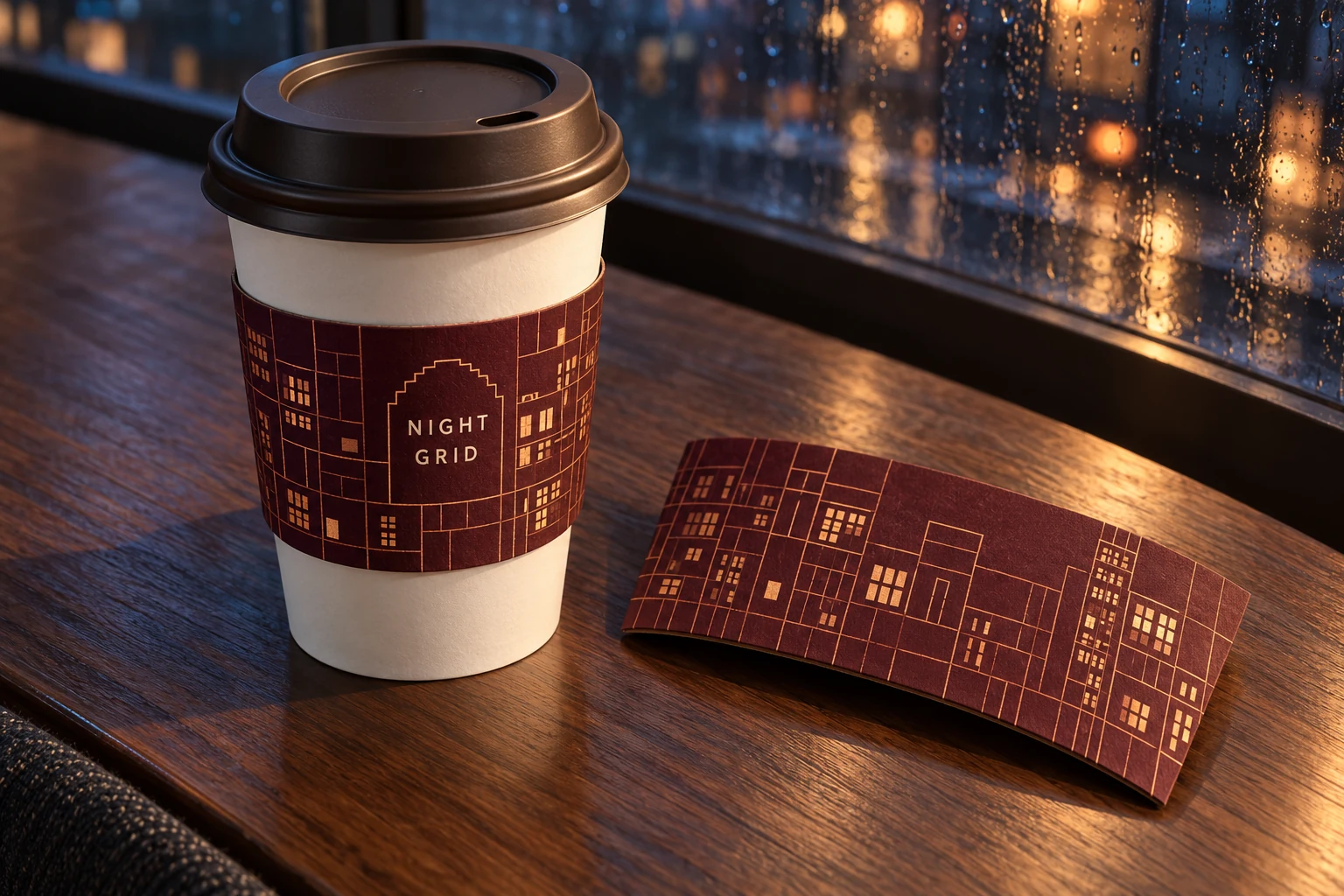
03 — Night Grid: A Quiet Pattern for an Evening Identity
Night Grid combines deep burgundy with a copper-toned city-window grid. An angled close-up on a wooden table shows one wrapped cup and one sleeve lying flattened beside it. This view makes the relationship between the graphic band and the separate cup easier to inspect.
The front mark needs an open area within the grid. Treat the copper appearance as a color direction for discussion; the concept does not specify metallic ink or foil. A restrained pattern can continue across the sleeve while the main message stays concentrated on the viewing face.
Choose it for: an evening café program or a brand with an architectural visual language.
Watch for: thin lines need a printer-approved minimum weight, and a rigid grid may reveal a mismatch at the join. Increase line weight or create a deliberate interruption near the closure if the proof requires it.
Which Direction Should Lead the Brief?
Herbarium Fold is the recommended starting point for an everyday café program. Its large botanical shapes and open front area make the visual hierarchy easy to explain and adapt. That is an editorial design recommendation, rather than a claim about print cost or performance.
| Concept | Main design strength | Decision before artwork approval |
|---|---|---|
| Herbarium Fold | Clear mark with a broad botanical motif | Confirm contrast on the selected stock |
| Daybreak Loop | Related versions with visible color and shape changes | Confirm background treatment and color reproduction |
| Night Grid | A restrained architectural pattern | Confirm line weight and closure treatment |
Build the Layout Around What Remains Visible
A flat coffee cup sleeve design template is a working surface, not a reliable preview of every assembled view. Mark the main viewing face, side areas, closure and any region the supplier identifies as hidden or unsuitable for essential content.
Put the brand identifier where it can remain complete. Use side areas for supporting motifs that tolerate partial views. If a short message matters to the campaign, keep it together rather than splitting it across two ends of the template.
A useful review separates four decisions:
- Recognition: which name or symbol should the viewer notice first?
- Message: what single line supports the campaign?
- Continuation: which shapes can wrap or end without looking broken?
- Action: does the sleeve need a destination, and is there room to present it clearly?
Avoid relying on a perfectly joined horizontal band unless the printer has reviewed it. Your Brand Cafe’s Dimpled Kraft Sleeve concept template specifically warns that a formed seam can move and that bands may not align exactly. Its tolerance applies to that product; the practical design lesson is to ask how the selected sleeve’s join should be handled.
Use the Supplier’s Cup Sleeve Design Template
A generic cup sleeve design template can help explore proportions and ideas. Final artwork should use the chosen supplier’s approved template for the actual sleeve and cup pairing. Save the template revision alongside the artwork so later reviewers know which structure was used.
Distinguish these template zones:
| Zone | What the designer needs to establish |
|---|---|
| Cut line | Where the finished sleeve edge will be cut |
| Bleed area | How far edge-reaching backgrounds must extend |
| Safe or essential area | Where important text and marks should remain |
| Closure or overlap | Which areas are hidden, joined or restricted |
The required clearances come from the printer. Newprint’s official sleeve artwork instructions require its template dimensions and orientation to remain unchanged, with design on the designated layer and attention to bleed, safe areas and glue clearance. Use those as examples of the checks a supplier may require, rather than transferring its specifications into a different production workflow.
Do not manually bend or stretch text simply because the sleeve wraps around a cup. Supplier instructions differ: Hotshot’s template guidance discusses arced artwork, while Your Brand Cafe’s concept template says not to warp it. Ask the selected printer who handles distortion and how it should appear in your submitted file.
Turn the Concept into a Reviewable Print File
For paper cup sleeve design, request the printer’s file checklist before exporting. Confirm the accepted file format, color setup, font handling, image quality, line limits and treatment of template guides. Keep an editable master as well as the requested submission file.
Prepare original vector logos and graphics where available. For photographs or textured elements, ask the printer to review effective resolution at their final placed size. Confirm whether fonts should be embedded, outlined or supplied under the appropriate license. Hotshot’s template instructions cover vector artwork, font handling, color and image preparation for its own workflow; your selected printer must confirm the applicable requirements.
Keep special finishes explicit. A copper-colored shape in a mockup should not silently become a foil requirement. Similarly, a kraft appearance in an image should become a named, approved stock choice in the production brief. Separate the intended look from the manufacturing method used to achieve it.
If you include a QR code, add the actual destination and production code as controlled artwork. Test the code on the reviewed physical sample. A generated visual placeholder should not be treated as a functioning campaign asset.
Review Flat Artwork and the Wrapped Sample Separately
When deciding how to design a cup sleeve, use two approval views. Flat artwork helps reviewers inspect spelling, graphic placement, version names and template zones. A wrapped review helps them judge the visible face, closure, relationship to the cup and whether the message remains coherent as the cup turns.
Start with an actual-size paper layout for a practical composition check, then request the supplier’s appropriate sample and approval proof. A desktop mockup can reveal a layout issue; it cannot approve production stock, color, construction or fit.
Name the approval stages in the brief. “Concept approved” can mean the team likes Herbarium Fold. “Artwork approved” should refer to an identified file revision. Physical fit and the supplier’s production proof need their own recorded decisions. Your Brand Cafe’s template makes this distinction explicit by separating concept placement from the official approval proof.
For multiple locations, give one person responsibility for consolidating feedback. Return one marked revision instead of separate instructions from marketing, procurement and operations. Record the file name, date, template reference and open questions each time the design changes.
Give Procurement a Design Brief It Can Use
The design brief should help purchasing compare like-for-like proposals without turning a creative preference into an assumed specification. Keep commercial ordering details in the custom coffee cup sleeve sourcing guide; use the table below to close design decisions.
| Brief item | Information to provide | Approval needed |
|---|---|---|
| Cup and sleeve pairing | Cup reference, sample or drawing; intended sleeve | Supplier confirms the pairing and template |
| Creative direction | Chosen concept, palette and primary message | Brand owner approves hierarchy |
| Stock and print appearance | Desired look and any finish expectations | Supplier confirms the proposed construction and process |
| Artwork package | Editable files, submission file and template revision | Prepress reviews file preparation |
| Variants | Store, campaign or language versions | Named owner approves every version |
| Proof record | Current file name and unresolved points | Authorized reviewer signs the final proof |
Before requesting PaperBull custom printing support, assemble this handoff package:
- The exact cup reference and the supplier-approved sleeve template.
- One selected concept with its intended colors, message and viewing face.
- Original logo files, licensed fonts or approved outlined text, and linked assets.
- A flat artwork file and a wrapped visual, clearly labeled by purpose.
- A list of variants, closure restrictions and questions for prepress.
- A named approver and a record of which proof revision is ready for review.
Frequently Asked Questions
Can I Use One Sleeve Design Across All Cup Sizes?
You can share a visual system, but ask the supplier to confirm each cup-and-sleeve pairing. Artwork may need repositioning on a different template.
Is a Downloaded Template Ready for Production?
Only if the selected printer confirms it matches the product and current workflow. Use a generic download for initial exploration, then transfer the approved design to the correct template before submission.
Should Artwork Be Curved Before Sending It?
Follow the selected printer’s instructions. Some workflows request arced artwork; others explicitly prohibit warping. Confirm responsibility before altering text or graphics.
Do Designer Coffee Cup Sleeves Always Provide Insulation?
Do not infer performance from appearance. Packaging Sleeves UK describes its standard-paper promotional sleeves as non-insulating. Ask for evidence applicable to the specific construction and intended use.
What Should I Approve First: the Image or the Print Proof?
Approve the visual direction first, then review the actual artwork, fit and supplier production proof through the agreed stages. The three cup sleeve designs shown here are concepts and cannot replace those approvals.
Sources and Verification Notes
Technical references were reviewed on October 23, 2026. Their instructions apply to the named supplier’s products and workflow. Final production requirements must come from the printer handling your order.
- Newprint: sleeve template and Illustrator setup — template integrity, design layers and artwork zones.
- Your Brand Cafe: Dimpled Kraft Sleeve concept template — essential areas, seams and the distinction between concept and production proof.
- Hotshot: coffee sleeve templates — template options and supplier-specific artwork preparation.
- Packaging Sleeves UK: coffee cup sleeves — an example of promotional sleeves explicitly described as non-insulating.
Ready to Develop Your Sleeve Design?
Send PaperBull your exact cup reference, intended sleeve direction, artwork files, order quantities and destination market. Ask the team to review the cup-and-sleeve pairing, printing approach and sample requirements for your café group, distributor or event program.
Discuss Your Sleeve Design
Share the cup reference, artwork direction and requirements for your program.